

Reward the referrer
Pays a reward to those who brought the contact to the bot: the person who invited them, the one who invited the inviter, and further up the chain — up to the tenth level. The reward goes to the referrer's internal account. Invitation links are described on the Function reference page.
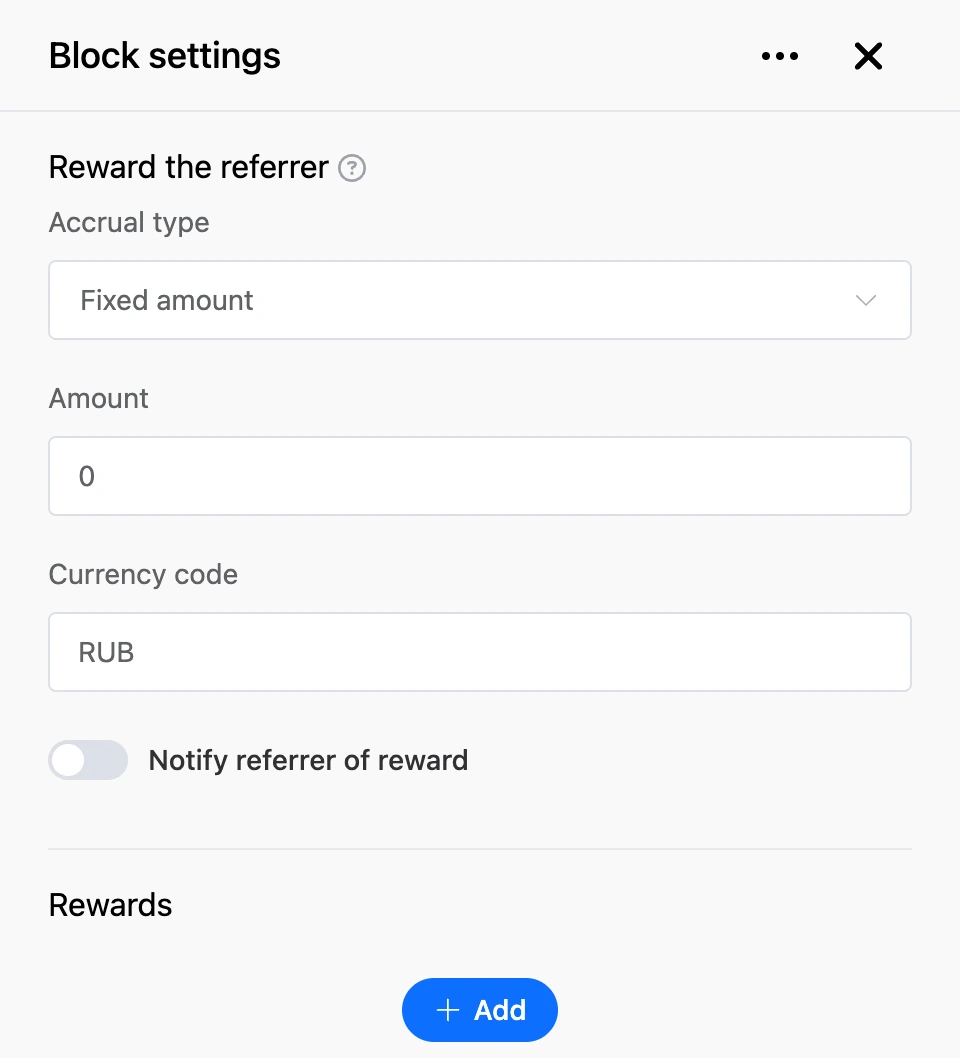
The reward is a percentage of a base amount. The base amount is set by "Accrual type", and the percentages for each level — by the "Rewards" list.
Settings
- "Accrual type" — the amount the percentages are calculated from:
- "Fixed amount" — from the amount entered in the "Amount" field;
- "Sum from variable" — from the number in the contact's local variable given in the "Variable" field;
- "Percentage from payment blocks" — from the amount of the payment after which the bot came to this block;
- 'Percentage from the "Top up a contact's account" block' — from the amount added by the "Top up a contact's account" block;
- 'Percentage from the "Debit from contact account" block' — from the amount debited by the "Debit a contact's account" block.
- "Currency code" — the currency of the account the reward goes to. The field is available for the "Fixed amount" and "Sum from variable" types. For the other types the currency is taken from the payment or from the account operation.
- "Notify referrer of reward" — send the referrer a message about the reward.
- "Notification text" — the text of that message. The buttons under the field insert reward data: "Referral level", "Reward amount", "Percentage of remuneration".
- "Rewards" — percentages by level. The "Add" button adds the next level, "Delete" removes the last one:
- "Reward yourself" — the percentage for the contact who reached the block. This is how cashback is done;
- "Reward referrer 1 level" — the percentage for the person who invited the contact;
- "Reward referrer 2 level" — for the one who invited the inviter, and so on up to the tenth level.
- "Tag reward" — a different percentage for referrers with certain tags. Enter the tags in the "Alternative reward activation tags:" field and the percentage in the "Alternative reward:" field. The referrer gets this percentage if they have all the listed tags; otherwise — the regular percentage of the level.
Outputs
- "Continue" — the bot moves on without waiting for the reward to be paid.
Good to know
- While the "Rewards" list has no rows, the block pays nothing.
- If the base amount is zero — for example, the variable is empty — no reward is paid.
- For the percentage types, the block must be placed in the same branch after the relevant block: after a successful payment, top-up or debit. Otherwise it has no base amount.
- If the percentage of some level is zero, that level is skipped, and the following ones get theirs. If the chain of inviters ends earlier, the payout stops there.
- Only referrers get the notification. The bot does not write to the contact about "Reward yourself" — tell them about it in the next block.
For example, after an order is paid: the "Percentage from payment blocks" type, "Reward yourself" — 5, "Reward referrer 1 level" — 10. The buyer gets 5% of the payment amount on their account, and the person who invited them gets 10%.