

Save user answer to variable
Saves the text of the last message the person wrote to the bot to a variable.
There are two kinds of variables:
- A local variable belongs to one contact. Each contact has their own value: a name, a city, a chosen product.
- A global variable belongs to the bot and is one for everyone. If one contact changes it, everyone else sees the new value.
How to insert both kinds into messages is in the Templates section.
Settings
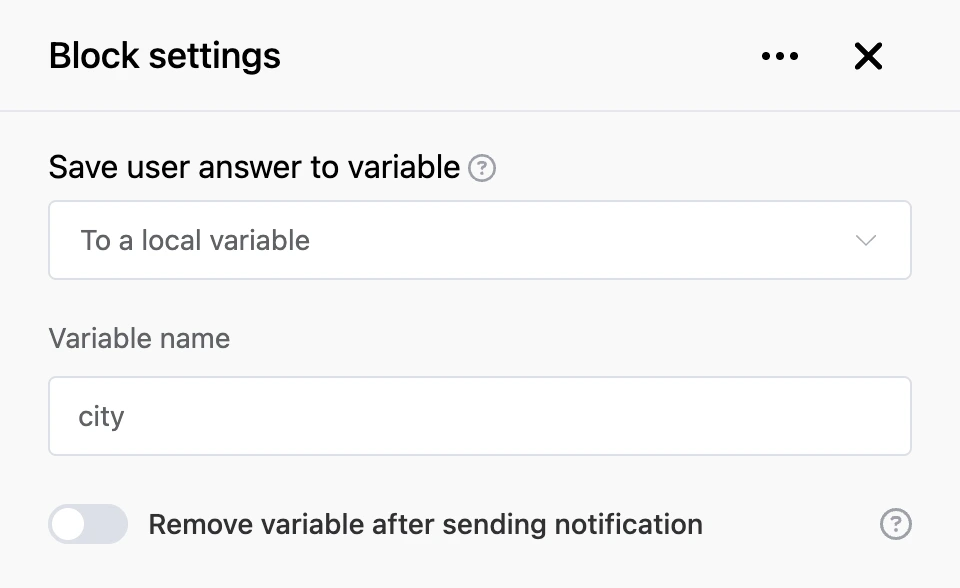
- "To a local variable" or "To a global variable" — where to save the answer.
- "Variable name" — the name the answer is saved under. As you type, suggestions with existing variables appear.
- "Remove variable after sending notification" — for a local variable only. The variable will be deleted after the notification is sent and will not get into later requests. Such variables are deleted by the "Request" block.
Outputs
- "Continue" — the bot moves on right after saving.
Good to know
- If no variable name is given, the block saves nothing.
- If a variable with this name already exists, its value is replaced with the new one.
Warning
Do not save personal answers to a global variable: the next contact will overwrite the value. A global variable suits shared things — for example, a counter of participants.
Tip
To save an answer right after a question, a separate block is not required: the settings of the question block have the "Write the answer to the user variable" switch.