

GetCourse order
Creates an order on GetCourse for the contact who reached the block. The contact's email, name, phone and all variables are passed to GetCourse — they are written to the additional fields of the user and the order. The contact_id field with the contact's ID on the platform goes there too.
What to connect in advance
In the GetCourse integration, enter the "Account name" — the account name from the address name.getcourse.ru — and the "Secret key". After saving, the "Webhook" tab opens with an address to call from GetCourse processes. It is needed for the bot to learn that the order has been paid.
Settings
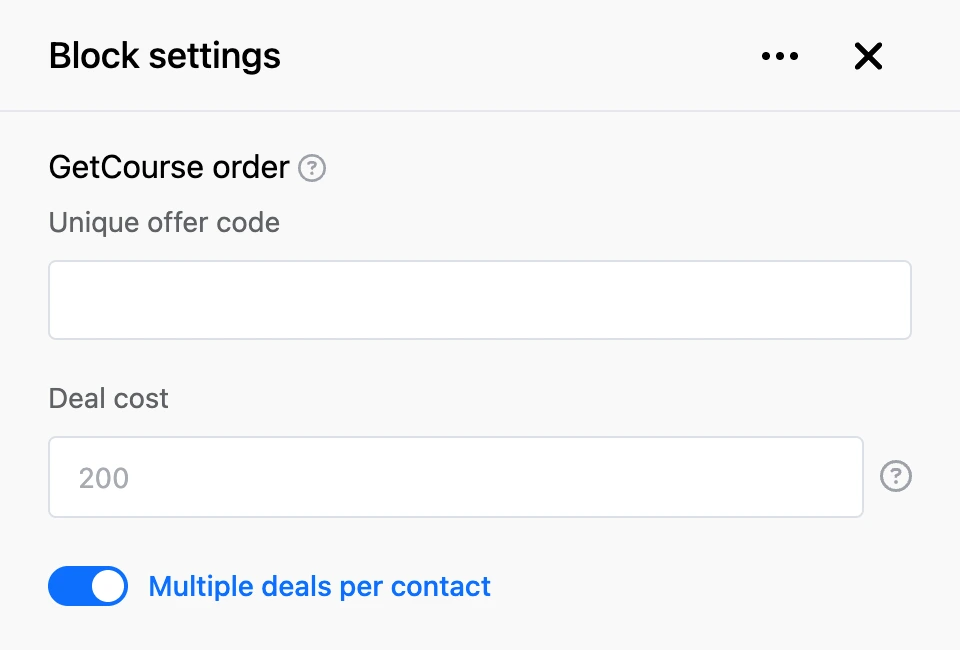
- "Unique offer code" — the code of the GetCourse offer the order is created for.
- "Deal cost" — the cost of the order. You can use templates, for example a variable with the amount.
- "Multiple deals per contact" — on: every pass through the block creates a new order. Off: the block updates the first order already created for this contact.
Outputs
- "Continue" — right after the block, without waiting for the payment.
- "Successful payment" — when GetCourse has called the Webhook from the integration and passed a link to the purchase in the
linkparameter. The bot sends the person the message "Link to your product - …" and leads them through this output.
Good to know
- The contact must have an email. Without it the block does not create an order. Ask for the email earlier in the scenario.
- The Webhook finds the contact by the
emailoruser_idparameter. Inuser_id, pass the contact's ID on the platform — the value of thecontact_idfield. - If
payment_linkis passed to the Webhook instead oflink, the bot sends the person the message "Link to pay order on GetCourse - …". The output is not followed in this case. - If the order could not be created, the person will not know about it: the reason is visible only in the block's execution log.