

Global menu
The global menu is a set of commands that work from anywhere in the bot. For example, "Menu", "Operator" or "Help": the person types such a phrase, and the bot takes them to the right block, wherever they are.

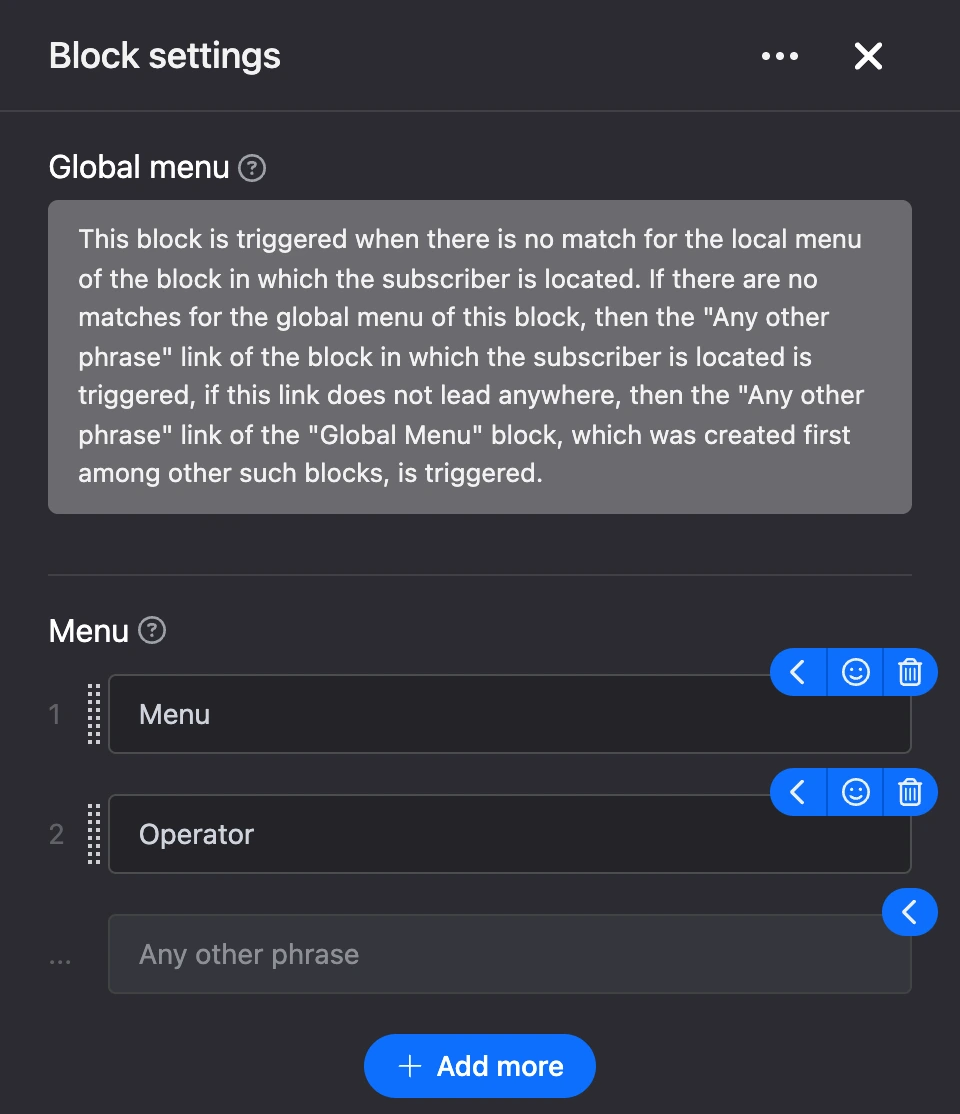
This block shows no buttons in the chat: its items are phrases the person types themselves. You cannot draw a connection to the block — it fires on its own.
Settings
- "Menu" — the items of the global menu. Add an item, type a phrase and connect its output to the block the person should get to. The phrase must match the item in full. This block has no item settings window, layout or text menu.
Outputs
- Menu items — each has its own output.
- "Any other phrase" — a fallback output for the whole bot, see below.
When it fires
The bot processes the person's reply in order:
- It looks for a match among the buttons of the block the person is in.
- If there is no match, it looks for the phrase among the global menu items.
- If it is not there either, it follows the "Any other phrase" output of the block the person is in.
- If that output leads nowhere, it follows the "Any other phrase" output of the global menu. When there are several such blocks, the one created first is used.
The global menu also works in blocks without buttons of their own — for example, while the bot is waiting for a phone number or email.
Tip
Connect the global menu's "Any other phrase" to a hint block: "I didn't get that, please choose an option from the menu". Then the bot will not leave a person without a reply in any block.