

Team members and content review
Team member access
You can run a school as a team: a course designer builds courses, curators review assignments, a manager watches orders. The school owner can do everything; a team member can do only what their role allows.
Access to schools is granted at the project level: a team member invited to the project sees all schools of that project within their permissions. How to invite a team member and set up a role is described on the Team member access page and in the Account and projects section.
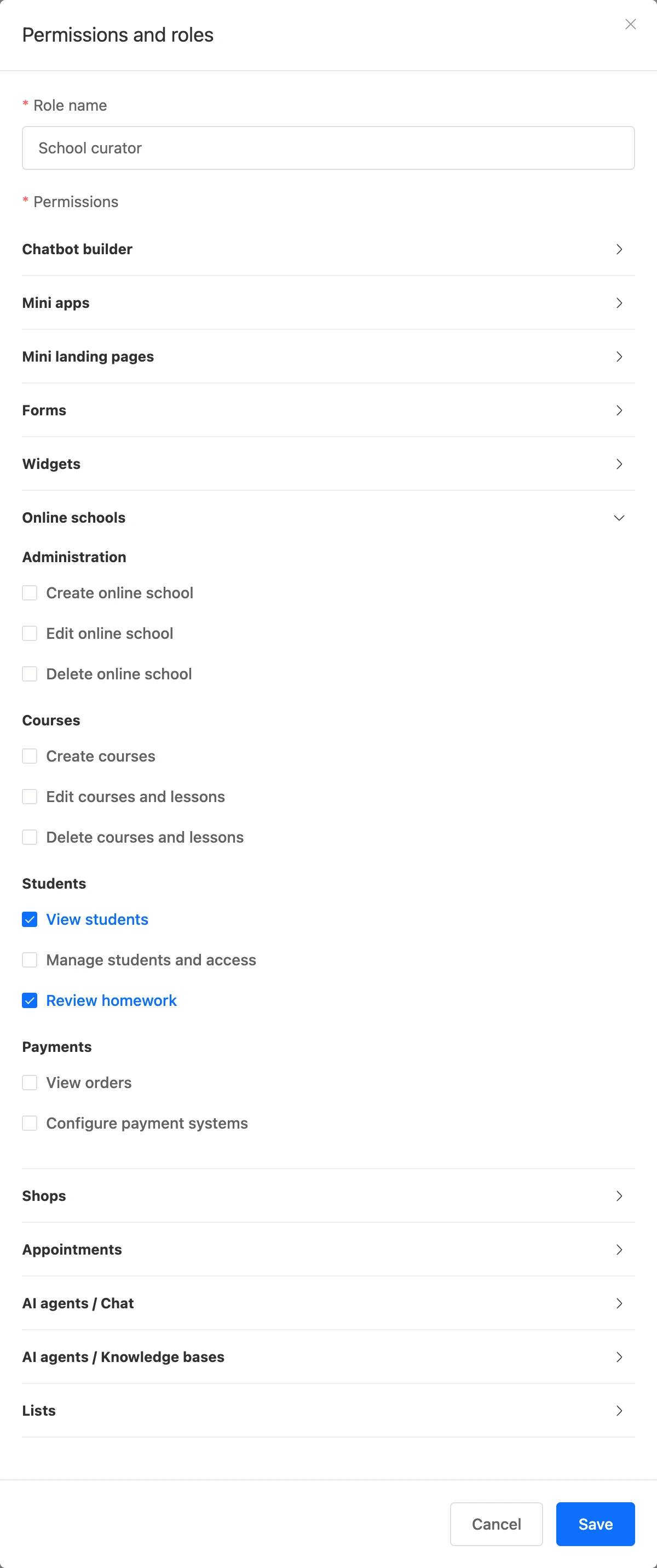
School permissions are collected in the role under the "Online schools" group:
| Group | Permission | What it opens |
|---|---|---|
| "Administration" | "Create online school" | Creating schools in the project |
| "Edit online school" | The "Settings" section — general, pages, domain; certificate design and revocation; paying for the plan; renaming the school | |
| "Delete online school" | Deleting schools | |
| "Courses" | "Create courses" | Creating courses |
| "Edit courses and lessons" | Curriculum, lessons, quizzes, access packages, course curators, the video library | |
| "Delete courses and lessons" | Deleting courses, sections and lessons | |
| "Students" | "View students" | The "Students", "Analytics" and "Certificates" sections |
| "Manage students and access" | Granting, freezing and revoking access, blocking and deleting students | |
| "Review homework" | The "Homework review" and "Questions" sections — for courses where the team member is assigned as a curator | |
| "Payments" | "View orders" | The "Orders" section |
| "Configure payment systems" | The "Accepting payments" subsection in the school settings |
What to keep in mind:
- For a team member to see the "Online schools" section in the project, their role must have at least one permission from this group.
- Any team member with access to the school sees the "Courses" section and the "Plan" page. Without the "Edit courses and lessons" permission, the course and lessons open in view-only mode.
- A team member with the "Review homework" permission sees assignments and questions only for the courses where they are assigned as a curator. How to assign them is on the Homework and questions page.
- Only the project owner can move a school to another project.
- The school plan is paid from the school owner's balance, even if a team member clicked the button. The team member does not need a subscription.
Content review by the platform
The platform reviews published lessons and school pages. Students see the material right after publishing — the review follows and does not get in the school's way. If everything is fine, you will not notice anything.
If the material breaks the rules, the school owner receives a notification with the reason:
- a lesson is unpublished and becomes a draft. Fix it and publish it again — it will return to students and go through the review once more;
- a school page stops being shown to students, and in the list of pages it has the "Not shown" status. After you edit its content, it is visible to students again and goes for another review.
Closing a school
For serious violations, the platform can close the whole school. Then the student portal does not open for students or guests: sign-in, sign-up and all pages respond with "The school is temporarily unavailable. Please contact the school." The owner receives a notification with the reason. Only the platform can reopen the school — you will be notified about that too.
Issued certificates keep opening at their links when the school is closed.