

Code in the app
Almost everything in a mini app is built without code. When the ready-made elements and blocks are not enough, you can add your own code in three places:
| Where | When it runs | What for |
|---|---|---|
| The "JavaScript" block | When the scenario reaches the block | An action on a tap: copy text, open a link, calculate a value, talk to the messenger's bridge |
| App code | Once at launch, before the first screen, and then — on events | Analytics counters, your own styles, external widgets |
| "HTML code" — an element or the whole screen | While the screen is open | Custom layout, a calculator, a third-party service widget |
The code runs on the person's device. So a person who knows their way around a browser can see it and fake what the code sends to the server. Do not store secret keys in the code, and limit which variables and tags the code can change — more on that below.
The "JavaScript" block
A block from the "Data and logic" category. When the app reaches the block, it runs the code and goes on through the "Done" or "Error" exit.
| Setting | What it sets |
|---|---|
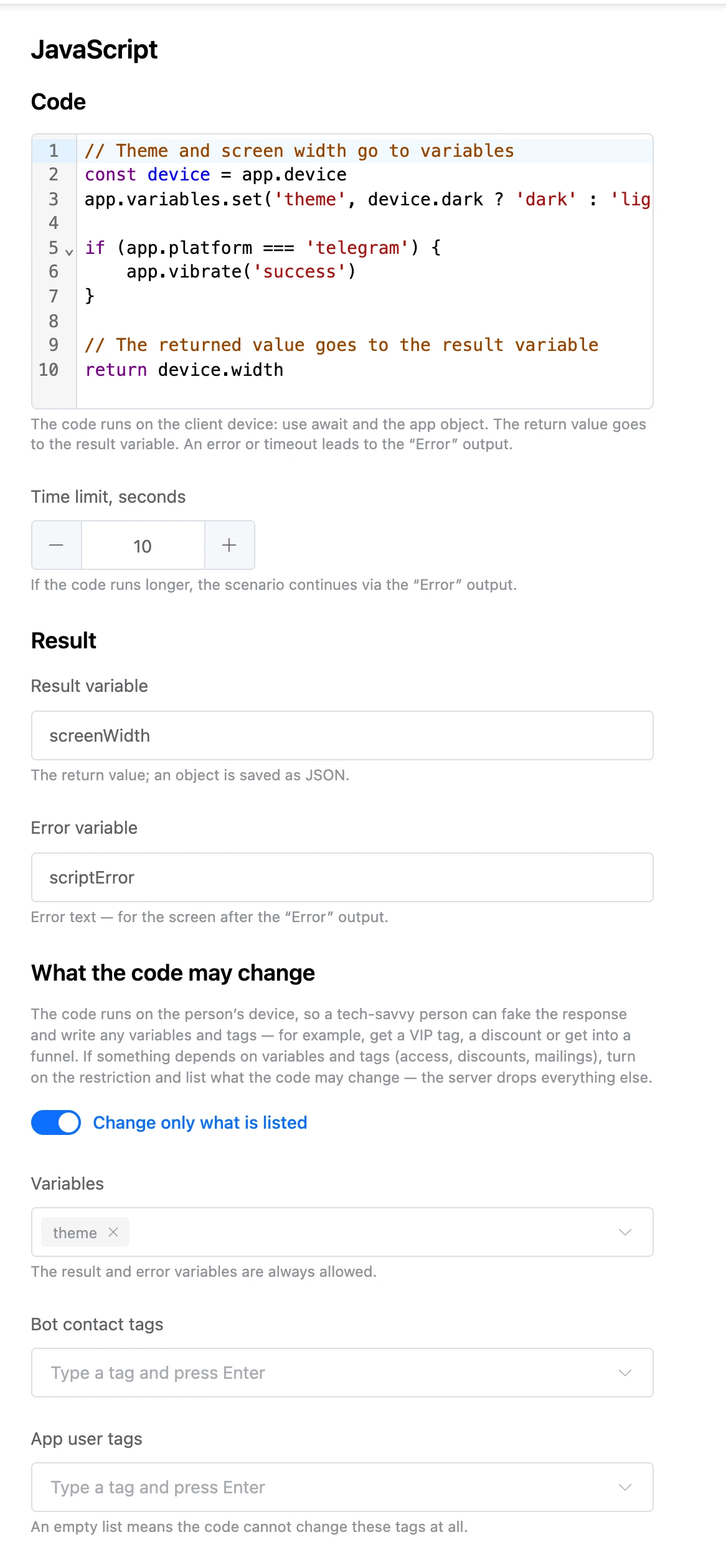
| "Code" | The body of an async function: write with await and the app object. Up to 20,000 characters |
| "Time limit, seconds" | From 1 to 60, 10 by default. If the code does not fit, the scenario goes through the "Error" exit, and the code itself may finish in the background |
| "Result variable" | What return returned. An object is written as JSON |
| "Error variable" | The error text — for the screen after the "Error" exit |
| "What the code may change" | The allow list — see below |
{{ name }} templates do not work in the code: read variable values with app.variables.get().
Variables written with app.variables.set() and changed tags go to the server together with the block's exit.
"What the code may change"
The "Change only what is listed" switch is on in a new block. With it, the server accepts from the code only:
- variables from the "Variables" list;
- tags from the "Bot contact tags" and "App user tags" lists — an empty list means the code does not change these tags at all;
- the result and error variables — they are always allowed.
The server drops everything else and writes "The block dropped what the code wrote" to the error log. If the code writes names that are not on the lists, the block settings warn you about it and offer "Add to the lists".
Turn off the restriction only if nothing depends on the variables and tags: otherwise a person could give themselves, for example, a VIP tag or a discount.
The app object
| Call | What it does |
|---|---|
app.variables.get('name') |
A variable's value |
app.variables.set('name', value) |
Write a variable — it goes to the server with the block's exit |
app.variables.all() |
All variables as an object |
app.tags.has('vip') / add('vip') / remove('vip') / all() |
The app user's tags — everyone has them, even without a chatbot |
app.contact?.name |
The chatbot contact: id, name, first_name, last_name, username, phone, email, address, source, created_at, telegram_id, max_id. null if the app was not opened from a bot |
app.contact.variables.get('name') / set('name', value) |
The contact's own variables, separate from the app's variables. What is written goes to the contact with the block's exit |
app.contact.tags.has('vip') / add / remove / all() |
The bot contact's tags |
app.platform |
Where the app was opened from: telegram, max, webchat, pwa or browser |
app.startParam |
The launch link parameter (startapp) |
app.user |
language, name and username in the messenger |
app.device |
mode (ios or md), dark, standalone, width, height, userAgent |
await app.toast(message) |
A pop-up message |
await app.alert(message, title) |
A message with an OK button — waits until it is closed |
await app.confirm(question) |
A "yes or no" question — returns true or false |
app.openLink('https://…') |
Open a link: in a messenger — with its own means, otherwise in a new tab |
await app.copy(text) |
Copy to the clipboard |
await app.share({title, text, url}) |
The system "Share" menu; without it — copying the link |
app.vibrate('success') |
Vibration: light, medium, heavy, success, warning or error |
app.localStorage.setItem('key', 'value') |
The user's storage on the server — see below |
app.storage.get('key') / set / remove |
Storage on the device, separate for each app |
await app.sleep(500) |
Wait the given number of milliseconds |
app.close() |
Close the app |
app.telegram |
Telegram.WebApp as is; outside Telegram — null |
app.max |
The MAX bridge as is; outside MAX — null |
An example from the block settings:
// Theme and screen width — into variables
const device = app.device
app.variables.set('theme', device.dark ? 'dark' : 'light')

if (app.platform === 'telegram') {
    app.vibrate('success')
}

// What is returned goes into the result variable
return device.width
Code errors are visible in the browser console in the preview and get into the error log — "JavaScript error".
App code
Code for the whole app: it runs once at launch, before the first screen, and listens to events. It opens with the "App code" button (the "</>" icon) on the toolbar above the scheme. If code is set, the icon is coloured.
In the "App code" window:
- "Code" — up to 100,000 characters;
- "Variables the code may write" — up to 50 names. The server does not accept other variables;
- a cheat sheet of events and an "Example" with the "Insert example" button.
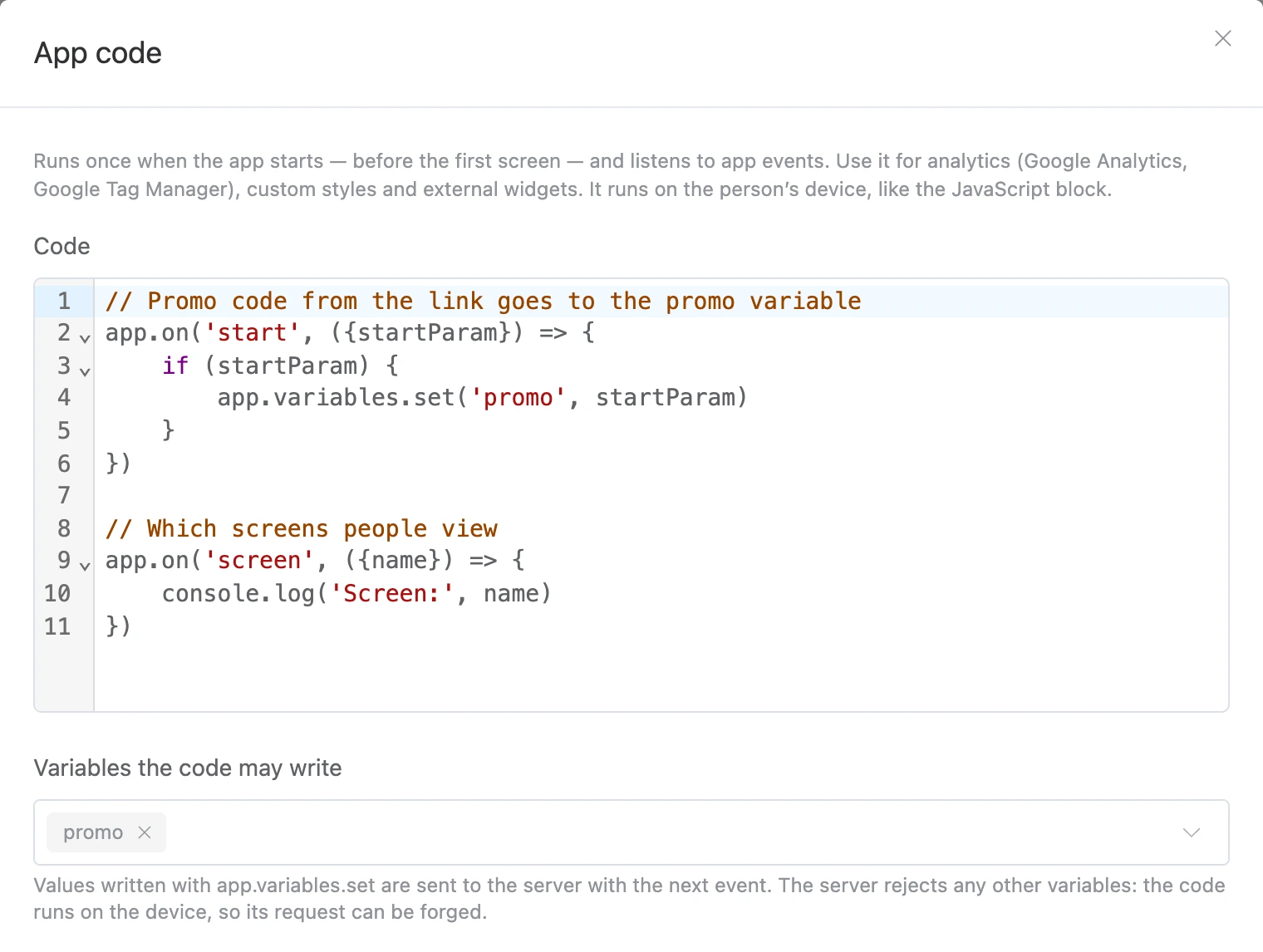

The code is stored in the version: a new version and a template get a copy of it. After saving, an open preview restarts.
Events
| Subscription | When it fires |
|---|---|
app.on('start', ({platform, startParam}) => {}) |
The app has launched |
app.on('screen', ({id, name, type}) => {}) |
A screen or a window over it is shown |
app.on('event', ({blockId, eventId}) => {}) |
A tap on a button, row or element — before it is sent to the server |
app.on('field', ({variable, value}) => {}) |
The person changed an input field |
app.on('error', ({message}) => {}) |
The app showed an error |
app.on('hide', () => {}) / app.on('show', () => {}) |
The app was minimized and brought back |
app.on('theme', ({dark}) => {}) |
The light or dark theme changed |
app.on('storage', ({key, newValue}) => {}) |
The code of an "HTML" element wrote to localStorage |
- A subscription to
start,screenandthemeimmediately gets the current value — even if you subscribed after anawait. app.on()returns an unsubscribe function:const stop = app.on(…); stop(). There is alsoapp.off(name, handler).await app.loadScript('https://…')loads an external script: a counter, a widget, a library. Onlyhttp://orhttps://addresses.
Everything else is the same as in the "JavaScript" block: app.variables, app.toast, app.alert, app.openLink, app.storage, app.localStorage, app.telegram and others. app.contact and app.tags are read-only here: changing tags is the job of the tag blocks.
Variables written with app.variables.set() go to the server with the next event.
An example from the window — Yandex Metrica:
// Load Yandex Metrica
await app.loadScript('https://mc.yandex.ru/metrika/tag.js')
ym(12345678, 'init', {defer: true})

// Every screen is a page view
app.on('screen', ({id, name}) => {
    ym(12345678, 'hit', '/screen/' + id, {title: name})
})

// Taps are goals
app.on('event', ({eventId}) => {
    ym(12345678, 'reachGoal', 'click_' + eventId)
})
App code errors — at launch and in handlers — are visible in the console and get into the error log with the "Error in the app code" reason and a stack trace. The same error is written once.
"HTML code": element and screen
Your own HTML with scripts and styles comes in two kinds:
- the "HTML code" element — in the "Widgets" group; it goes into a screen area next to other elements;
- the "HTML code" screen — the third screen type after "Standard window" and "Bottom tabs": the whole screen is your code, without a header or areas. A new screen of this kind immediately gets an example with a button and the
nextexit. It cannot be turned into a modal.
The code runs in an isolated frame: the session, the app's data and the rest of the screen are not available to it. Scripts and styles go inside the code. The frame takes the text colour from the app's theme.
| Setting | What it sets |
|---|---|
| "Code" | HTML up to 100,000 characters |
| "Height" (for the element) | "Fit content" — adjusts to the code, including when the code changes its content itself; "Fixed" — from 40 to 2000 pixels, whatever does not fit scrolls inside |
| "Exits" | Up to 20. An exit has a "Key" (Latin letters, digits, _ and -) and a "Name on the scheme". An exit is a transition to another block of the scheme |
| "Variables the code may write" | Up to 50 names. The server does not accept other variables |


What the code in the frame can use
| Call | What it does |
|---|---|
app.event('next') |
Go through the exit with this key |
app.event('next', {name: 'value'}) |
Go and write allowed variables |
app.variables.set('name', 'value') |
Write an allowed variable right away, without a transition: the screen does not change |
localStorage.setItem('key', 'value') |
The user's storage on the server — see below. sessionStorage lives while the screen is open |
app.openLink('https://…') |
Open a link in the browser. Regular <a> links open the same way |
{{ name }} |
Insert a variable's value right into the code — as text, escaped |
On the scheme the code does not run — a placeholder is shown instead. In the screen editor the frame shows the result and restarts after the code is edited.
Storages
localStorage on the server |
app.storage |
|
|---|---|---|
| Where it is available | localStorage in the "HTML code" frame, app.localStorage in the "JavaScript" block and app code |
The "JavaScript" block and app code |
| Where it is kept | On the server, with the app user | In the person's browser |
| What it survives | A restart, a phone clean-up, switching devices in the same messenger | Until the browser data is cleared |
| Shared by | All "HTML code" elements, the app code and the "JavaScript" blocks of one app | Separate for each app |
| Values | Strings only, up to 100,000 characters including keys | Any values, saved as JSON |
The server storage is separate for each platform: one person has different storages in Telegram, MAX and the browser.
Limits
- "JavaScript" block code — up to 20,000 characters, app code and HTML code — up to 100,000.
- The run time of the "JavaScript" block — up to 60 seconds.
- No more than 20 errors per minute from one block get into the log.